CallPal
Most outbound dashboards measure activity because activity is easy to count. Dials went up, so something must be improving. The problem is that dials are an input a rep controls completely, which makes them the first number to move when a number is being watched, and the last one to correlate with revenue.
These are the twelve worth tracking, in the order they answer questions. Each definition is deliberately pedantic: a metric two managers compute differently is not a metric, it is a disagreement waiting to happen.
Reach: can you get anyone on the phone?
1. Dials per rep per day
Count of outbound call attempts, including the ones nobody answered. Useful only as a denominator and as a floor — a rep at fifteen dials has a capacity problem worth talking about. As a target it is actively harmful, because the cheapest way to hit it is to dial the numbers least likely to answer.
2. Answer rate (connect rate)
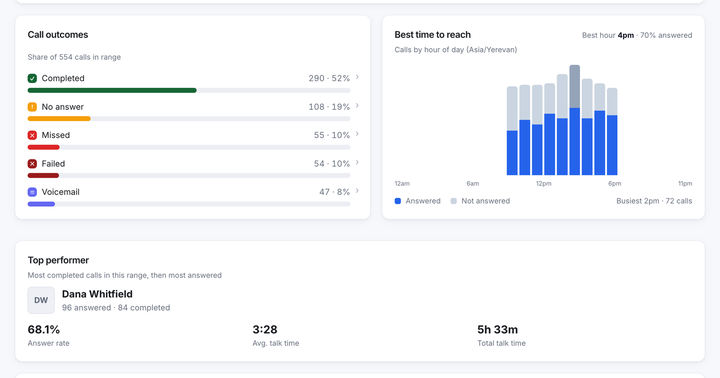
Answered calls ÷ total dials. The single most informative reach metric, and the one that moves for reasons outside the rep: list quality, time of day, whether your numbers have been flagged by carrier analytics. Decide once whether a voicemail counts as answered — we would say no — and never change it.
3. Contact rate
Distinct contacts reached ÷ distinct contacts attempted, over a period. Answer rate counts calls; this counts people. The gap between the two is your redial behaviour, and a large gap means a small number of contacts are absorbing a lot of dials.
4. Attempts to first contact
How many dials it takes to reach a given person for the first time. Compute the median rather than the mean; the distribution has a long tail, and the mean is dragged around by a handful of contacts nobody will ever reach. This is the number that tells you where to set your "stop calling" rule.
Quality: is anything happening on the calls?
5. Average talk time per answered call
Total talk time ÷ answered calls, measuring only the connected portion — not ring time, which would let a rep improve the metric by calling people who take longer to pick up. Two-minute averages mean conversations. Twenty-second averages mean the rep is being dismissed in the opening line, and no amount of extra dialing fixes that.
6. Conversation rate
The share of answered calls that lasted long enough to be a conversation — pick a threshold, sixty or ninety seconds, and hold it. This separates "they picked up" from "they engaged" and is the cleanest measure of whether an opener is working.
7. Meetings booked per 100 dials
The outcome metric for top-of-funnel outbound, normalised so it can be compared between reps with different capacity. Per 100 dials rather than per day, because per day rewards volume twice.
8. Meeting show rate
Booked meetings that actually happened. Track it or the previous metric becomes a competition to book anyone. A rep with 12 meetings at a 50% show rate is behind a rep with 8 at 90%, and only this number reveals it.

Efficiency: what is the time going on?
9. Talk time as a share of logged time
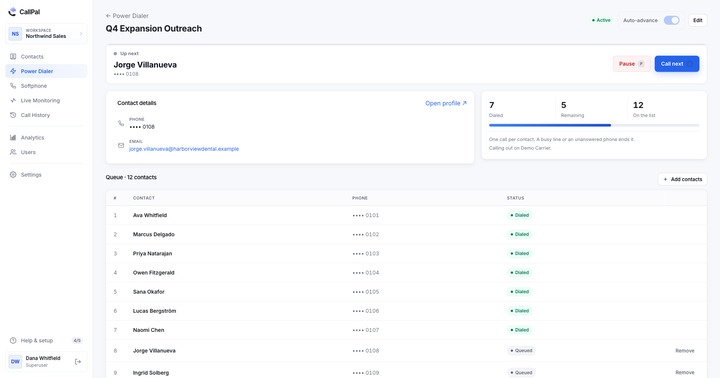
Total talk time ÷ hours logged in. Rarely above 25% for cold outbound, and if it is under 10% the constraint is almost always overhead between calls rather than the calls themselves. That is the specific waste a power dialer removes — see power dialer vs. predictive dialer.
10. Dead time per dial
(Logged time − talk time) ÷ dials. The most actionable number on this list, because it is measured in seconds and every second is recoverable. Thirty seconds per dial across 70 dials is 35 minutes a day, per rep, spent finding names and typing notes.
11. Failed-call rate
Calls that failed for technical reasons ÷ total dials, kept strictly separate from calls nobody answered. This is an infrastructure metric masquerading as a sales one: a rise means a carrier problem, a trunk problem or bad numbers in the list, and it should be visible to whoever can fix that.
12. Answer rate by hour of day
The same metric as #2, sliced by the hour the call was placed in the callee’s time zone. It is the only one of the twelve that tells a rep what to do differently tomorrow morning. The best time to make sales calls covers how to read it without fooling yourself.
Three metrics to stop reporting
- Total calls, unnormalised. Comparable between two reps only if they worked identical hours on identical lists, which they did not. Use dials per day, or a per-100-dials rate.
- Total talk time as a leaderboard. Rewards the rep who cannot end a call with someone who will never buy. Pair it with meetings booked or drop it.
- Activity scores that add unlike things. A composite of dials plus emails plus LinkedIn touches is a number that cannot go down for a good reason and cannot be debugged when it goes up.
How to read the dashboard
- Start with the spread, not the average. Six reps averaging 68% answer rate could be six reps at 68% or three at 85% and three at 51%. Only the second is a coaching opportunity, and the average hides which one you have.
- Change one thing per week. Calling window, opener, or list source. Change two and you have learned nothing about either.
- Give a change two weeks. Answer rate on a few hundred dials is noisy enough that a bad Tuesday looks like a trend.
- Separate the rep from the infrastructure. Answer rate falling across every rep at once is not a coaching problem. Check failed-call rate and whether your numbers have started arriving flagged.
- Reconcile to the CRM. If the dialer says 340 calls and the CRM shows 210 activities, your pipeline reporting is running on the smaller number. Fix the logging before you trust either.