CallPal
The short answer: if you need one phone system that also takes inbound calls and texts, start with Aircall, JustCall, Ringover, KrispCall or Allo. If your team mostly makes outbound calls, works lists on custom objects, and has a SIP carrier or will set one up, look at CallPal.
Disclosure: CallPal wrote this post, and CallPal is one of the seven options. Every statement about another vendor comes from that vendor’s own site or Attio’s app directory, checked on 8 October 2026. Where a page didn’t say, we write "check their site" instead of guessing. There are no competitor prices here, because they change too often for a blog post to keep up.
What a dialer for Attio actually has to do
Almost every calling tool says it "integrates with Attio", which covers very different things. Five questions separate them:
- Where do you dial from? Some tools add a call button inside Attio through an extension or desktop app. Others import your Attio records and you dial from their app. Both work; know which you are buying.
- Does the call log back to the right record, automatically? This is the half that matters. A call that never reaches Attio is invisible to your pipeline reports. Check what lands there, and on which record.
- Does it understand custom objects? Attio lets you model your business with your own objects: Investors, Properties, Applicants. If the dialer only reads People and Companies, the part of your workspace you built yourself is invisible to it.
- Can it work a list in sequence? Clicking one number at a time is click-to-call. Working through a filtered list, with the next call starting when the last one ends, is a power dialer. For cold calling, that adds up to hours a week.
- Who carries the minutes? Most calling tools are also your phone carrier. You rent numbers from them and they bill the minutes. A smaller group is BYOC, bring your own carrier: you connect a SIP trunk you already pay for. Our BYOC guide explains the trade-off.
The seven options at a glance
| Aircall | JustCall | KrispCall | Ringover | Allo | CloudTalk | CallPal | |
|---|---|---|---|---|---|---|---|
| Where you dial | From Attio People and Companies, with the Aircall desktop app open | Inside Attio, via the Chrome extension | Inside Attio, via the browser extension | From Attio, via the extension or web app | From Attio, with the Allo desktop app running | Not available yet | In CallPal, on records imported from Attio |
| What logs back to Attio | A note on the person: who called, when, how long, Aircall call notes | Calls, recordings, voicemails, SMS and notes on the People record | Calls, notes, recordings and voicemails | Calls as notes; SMS and WhatsApp too | A note with AI summary and transcript; SMS as notes | Not available yet | A note with outcome, duration, rep and recording link |
| Custom objects | Not mentioned on their page | Listed as a destination on their page | Not mentioned on their page | Not mentioned on their page | Custom fields on people and companies | Not available yet | Every object imports; calls log to any record |
| Dial an Attio list in sequence | Not mentioned on their page | Attio People lists into JustCall Sales Dialer campaigns | Power dialer on their site; Attio link not stated | Power dialer on their site; Attio link not stated | Power Dialer app in Attio (add-on) | Not available yet | Power dialer campaigns (Pro and up) |
| Inbound calls | Yes | Yes | Yes | Yes | Yes | Yes | No, outbound only |
| SMS logged to Attio | Not mentioned on their page | Yes | Yes | Yes, plus WhatsApp | Yes | Not available yet | No |
| AI summaries in Attio | Mentions call insights; check their site | Yes | Not mentioned on their page | Yes | Yes | Not available yet | No |
| Who carries the minutes | Vendor numbers; ask about BYOC | Vendor numbers; ask about BYOC | Vendor numbers; ask about BYOC | Vendor numbers; ask about BYOC | Vendor numbers | Vendor numbers; ask about BYOC | Your own SIP trunk (BYOC only) |
The options, one by one
Aircall
Aircall’s Attio app is listed in Attio’s directory as an official app, built by Attio. It adds click-to-dial on any Attio Person or Company and syncs your Aircall call notes back to Attio. Attio’s listing says the note lands on the person’s record within minutes, showing who called, when and for how long. Click-to-dial needs the Aircall desktop app open.
- Good for: teams that want a full cloud phone system, inbound and outbound, with an Attio integration Attio itself maintains.
- Watch out for: the Attio page describes click-to-dial and note sync. It doesn’t mention list dialing from Attio or custom objects, so check their site if you need either.
JustCall
JustCall builds its own Attio integration. Its page says every call, recording, voicemail, SMS and note syncs to the right Attio People record, with click-to-call and click-to-text through the JustCall Chrome extension. The most useful part for outbound teams is that you can import Attio People lists into JustCall’s Sales Dialer, run campaigns, and sync the results back with no CSV step. The page also lists custom objects among the places calls can be logged.
- Good for: teams that mix calls and texts, and want an Attio list to become a dialing campaign in a few clicks.
- Watch out for: an admin has to do the setup, and some AI features sit on higher plans. Check which plan includes what you need.
KrispCall
KrispCall’s Attio page covers click-to-call and click-to-SMS from Attio through its browser extension. It also logs incoming and outgoing calls automatically, syncs call notes, and links recordings and voicemails to the contact.
- Good for: a business phone system that covers calls and texts, with both directions logged in Attio.
- Watch out for: KrispCall has a power dialer, but the Attio page doesn’t say whether it dials Attio lists or works with custom objects. Check their site.
Ringover
Ringover lets you call in one click from Attio through its browser extension or web app. Every call is logged on the Attio record as a note, and SMS and WhatsApp messages sync too. After each call it generates a transcript, summary and next steps with its Empower AI, visible in Attio. Inbound calls from a known number can pop the Attio record.
- Good for: teams that talk to customers on several channels, WhatsApp included, and want AI call summaries without adding a separate tool.
- Watch out for: Ringover sells power and parallel dialers, but the Attio page doesn’t describe running them from Attio lists or custom objects. Check their site.
Allo
Allo is in Attio’s app directory, described as phone numbers with unlimited calls, synced to Attio. Allo’s own Attio page says you click a number in Attio and the call starts in the Allo desktop app. Each call is logged as a note on the matching person, company and deal, with an AI summary and transcript. People, companies and deals sync from Attio with their custom fields, and a Power Dialer app inside Attio sends selected records to a queue.
- Good for: small teams that want numbers, calling, AI notes and a power dialer that starts from Attio itself.
- Watch out for: Allo says the Attio integration is included from its Business plan up and the Power Dialer is an add-on. The desktop app has to be running to place calls.
CloudTalk
CloudTalk is a call-centre platform with queues, IVR and a dialer. On 8 October 2026, its own Attio page said the integration is "currently in development and not yet available", and that calling from inside Attio and deal association are planned for later releases. A CloudTalk entry does appear in Attio’s app directory, so check both before you plan around it.
- Good for: teams already on CloudTalk that can wait for the integration to ship.
- Watch out for: don’t plan a rollout around features the vendor says aren’t available yet.
CallPal
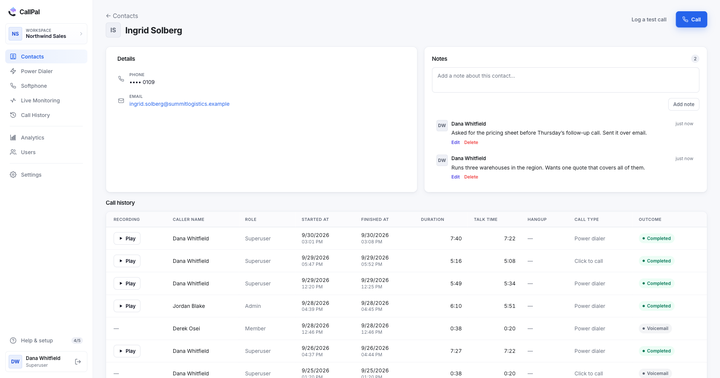
This is our product. CallPal is outbound calling software built around the CRM you already use. You connect Attio with one OAuth click, choose which objects to import (custom objects included, with their attributes) and dial from CallPal’s browser softphone. Every call logs back to the Attio record as a note with the outcome, duration, the rep who made it and a link to the recording. Records re-sync every 30 minutes. The Attio integration page and the setup guide go into more detail.
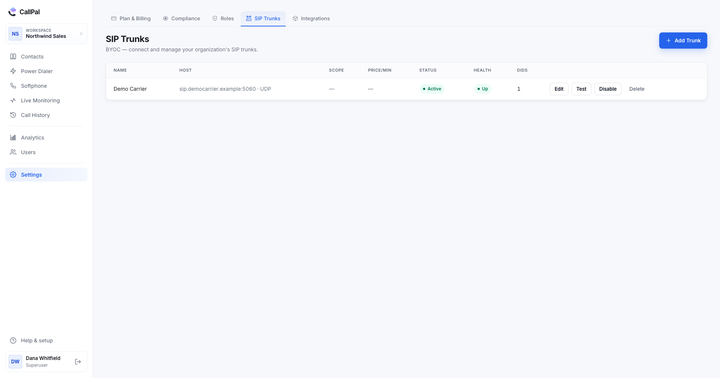
On top of click-to-call, you get power dialer campaigns on the Pro plan and up, voicemail drop, recording with an automatic recording disclosure, a do-not-call list, calling hours, and live listen, whisper and barge on the Scale plan. It is BYOC only: calls go out over your own SIP trunk (Twilio, Telnyx or any other) and CallPal adds no per-minute markup. Plans are $19, $39 and $59 per user per month, with a 14-day trial and no card required.
- Good for: outbound teams whose pipeline lives on custom Attio objects, who want calls logged on the right record without anyone typing, and who would rather pay their carrier’s rate than a reseller’s.
- Watch out for: CallPal is outbound only, with no inbound routing or IVR. There is no SMS or WhatsApp and no AI transcription. You dial from CallPal, not from inside Attio. Bringing your own SIP carrier is an extra setup step if you don’t have one yet.
How to choose
Start with what your team’s day looks like, not with a feature grid.
- You answer as many calls as you make. You need a phone system: Aircall, JustCall, KrispCall, Ringover or Allo. CallPal doesn’t handle inbound.
- Texts or WhatsApp are part of the sequence. JustCall, KrispCall, Ringover and Allo all log texts to Attio, and Ringover’s Attio page adds WhatsApp.
- You want AI call summaries in Attio. Allo, Ringover and JustCall all describe them on their Attio pages.
- Your pipeline lives on custom objects. Ask every vendor to show a call logged on one of your own objects during the trial. CallPal imports every object, and JustCall lists custom objects as a logging destination.
- You call through lists all day. You want a dialer that takes an Attio list directly. JustCall, Allo and CallPal describe this. For the rest, ask.
- You already pay a SIP carrier, or your minutes bill is growing. BYOC is where CallPal fits. Our outbound calling software guide covers the wider market.
Whichever you pick, run the same test in the trial: call ten real records, then open them in Attio. Each call should be on the right record, with duration and outcome, and nobody should have typed it. If that fails, nothing else on the list makes up for it. Logging calls in your CRM automatically explains why.